

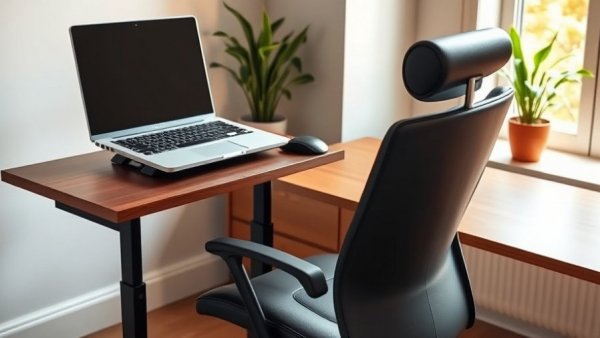
Transform Your Workspace with Ergonomic Essentials
As a small business owner, creating an ergonomic workspace can seem overwhelming, but the benefits of investing in the right setup are profound. Comfort and productivity are not just buzzwords; they are critical to the health of your business and yourself. Here’s how incorporating essential ergonomic office setup items can transform your daily routine and ensure sustainable productivity. A thoughtfully arranged workspace not only enhances your physical well-being but can also inspire creativity and innovation among your team.
The Best Foundational Piece: An Ergonomic Chair
Choosing the right ergonomic chair is undoubtedly the cornerstone of an effective office setup. These chairs are designed to support the natural curve of your spine, allowing you to sit comfortably for long hours. Look for adjustable lumbar support features that conform to your lower back, which can alleviate common aches and pains associated with prolonged sitting. An ideal ergonomic chair enables you to maintain a neutral spine alignment, promoting a more conducive working posture. Investing in a quality chair reduces fatigue and improves your focus, leading to better decision-making and increased business output.
Finding Your Ideal Desk Height
Desk height is often overlooked, yet it plays a significant role in maintaining a healthy posture. Ideally, your workspace should allow you to keep your elbows at a 90-degree angle while typing. Standard desk heights usually fall between 28 and 30 inches, but they may not accommodate everyone. If you’re shorter, a desk between 24 to 27 inches might be necessary. A footrest can serve as a simple fix for desks set too high, supporting your feet and encouraging proper leg alignment. It’s crucial that your knees remain slightly below the level of your hips when seated. Experimenting with desk height can make a significant difference. Many modern desks are height-adjustable, allowing you to switch between sitting and standing throughout the day, which can be beneficial for your circulation and overall energy levels.
Optimize Your Monitor Position
Setting up a monitor is not just about placing it on your desk; it involves thoughtful positioning for eye comfort. The top of the monitor should be at or slightly below eye level, positioning yourself 20 to 26 inches away, ideally. This setup helps minimize neck strain and eye fatigue. Consider utilizing a monitor arm to easily adjust the screen height, ensuring a comfortable viewing experience that supports your health. Additionally, remember to take regular breaks, using the 20-20-20 rule—every 20 minutes, look at something 20 feet away for 20 seconds. This small habit can significantly reduce eye strain over time.
Ergonomic Keyboard and Mouse: A Must-Have Duo
Even with a great desk and chair, many small business owners ignore the importance of an ergonomic keyboard and mouse. A split keyboard design can help maintain your wrists in a neutral position, preventing strain during long work hours. Similarly, opt for a mouse that correctly supports your hand and wrist's natural position. Brands like Kinesis and Logitech offer models specializing in comfort, making a long workday significantly easier. Investing in these tools not only enhances your immediate comfort but contributes to your long-term health and productivity. Encourage your employees to share feedback about their keyboard and mouse setups, as customizing these can lead to overall improvements in workflow efficiency.
Footrests: The Unsung Hero of Comfort
Many people don’t think about footrests, yet they provide critical support, especially if your chair is much higher than your desk. A footrest helps you achieve the correct alignment between your knees and hips while also providing break times for your legs. It’s a small addition that can make a huge difference in your overall workstation comfort. Consider selecting a footrest with adjustable height to better cater to various user needs in a multi-user office environment. Additionally, some footrests come with a rocking feature, stimulating circulation in your legs while you work, which is an added bonus.
A Culture of Ergonomics: Building a Healthier Environment
In 2023, promoting ergonomics within the office is more than just creating comfort; it’s about fostering a healthier workplace culture. As employees experience less discomfort, absenteeism due to musculoskeletal disorders decreases. Moreover, a healthier workforce translates to increased productivity and morale, enabling the business to thrive. Regular check-ins on employee comfort can promote community and encourage proactive adjustments to workstations. Encourage team members to share their ergonomic experiences and adjustments, reinforcing a culture of continuous improvement.
Incorporating Ergonomics as a Business Strategy
Small business owners may wonder if these ergonomic upgrades are financially feasible. However, considering the long-term investment in employee well-being, the initial costs pale in comparison to the eventual returns. Improved health leads to lower healthcare costs and reduced turnover rates, which translates into savings that can be reinvested in your business. Many countries even offer tax deductions or incentives for businesses that invest in employee wellness. By viewing these changes as an essential business strategy, you position your company for not only greater employee satisfaction but also improved overall performance.
Now that you know the fundamentals of creating an ergonomic workspace, take the next step and evaluate your current office setup. Consider implementing these essential items and watch your productivity soar, ultimately enhancing your overall business culture. Embrace the ergonomics transforming your workspace today! As you foster a healthier environment, your team will thrive, your productivity will increase, and your business performance will reflect the positive changes you’ve initiated.







Write A Comment